Examples
Each example is a real run of the skill on a fixture in examples/. Nothing here is mocked up.
Example 1
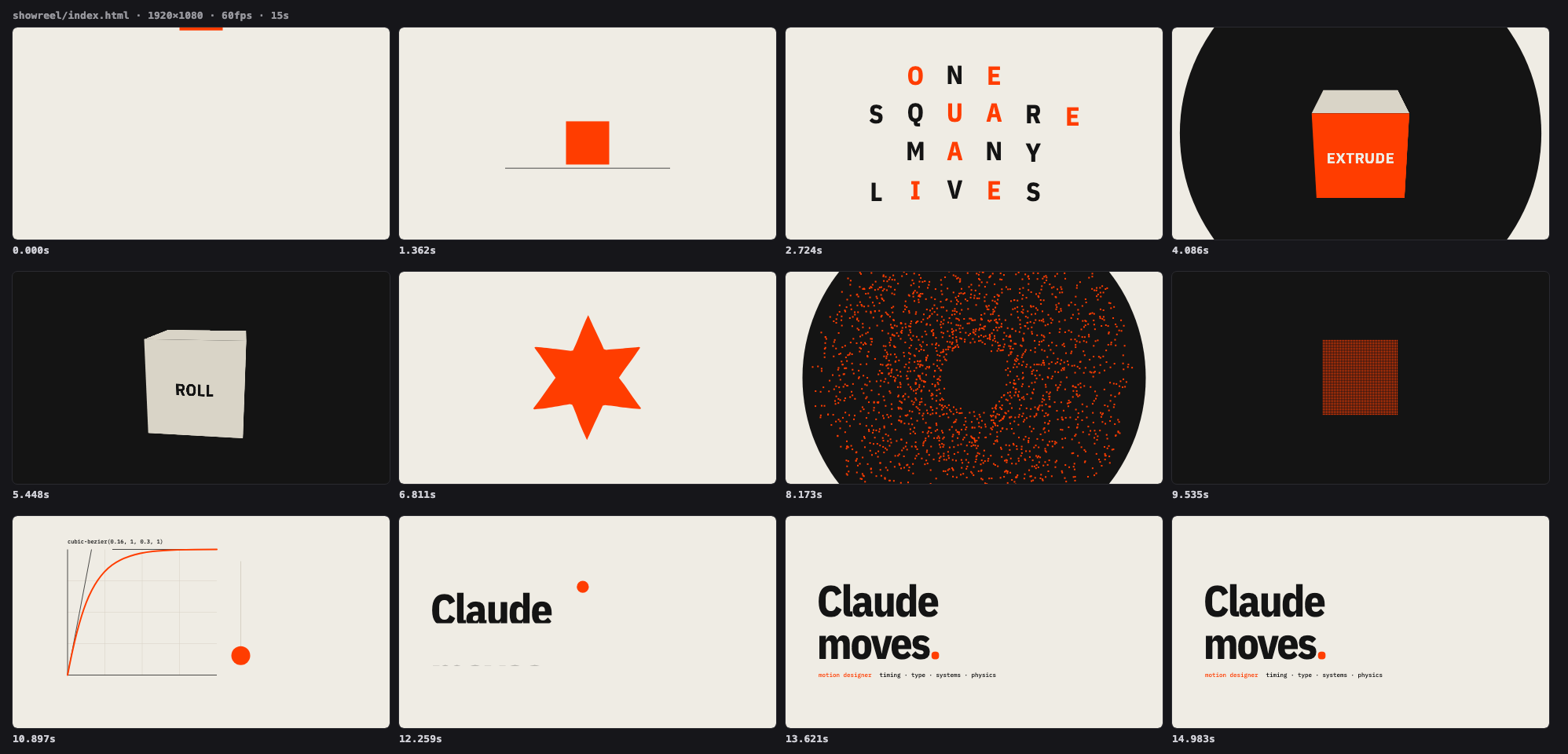
"Go all out": a 15-second showreel with its own score
YouMake a dynamic 15-second motion graphics video that shows what an incredible motion designer you are, like it's your showreel for a résumé. Go all out.
Creative-freedom mode. The concept is one vermilion square carried through seven techniques: squash and stretch with onion skins, a rippling type grid, a 3D cube turning on the beat, a liquid morph, particles assembling into a word, a graph editor whose curve then drives the move, and a match cut where the ball becomes the title's full stop. Cuts land on a 124 BPM grid; ink floods mark the two big beats, and the synthesized score puts a whoosh, hit, riser or drop on every cut.
◆ Check passed: no layout or timing issues found.
◆ Filmstrip (12 frames) → examples/output/showreel/filmstrip.png
◆ Score synthesized (driving, 124 BPM, 25 cues, -14.0 dBFS RMS)
◆ Done in 17.6s (capture 15.0s, 60.0 shots/s) → examples/output/showreel/showreel.mp4 (3.87 MB, 900 frames, 15s)
Example 2
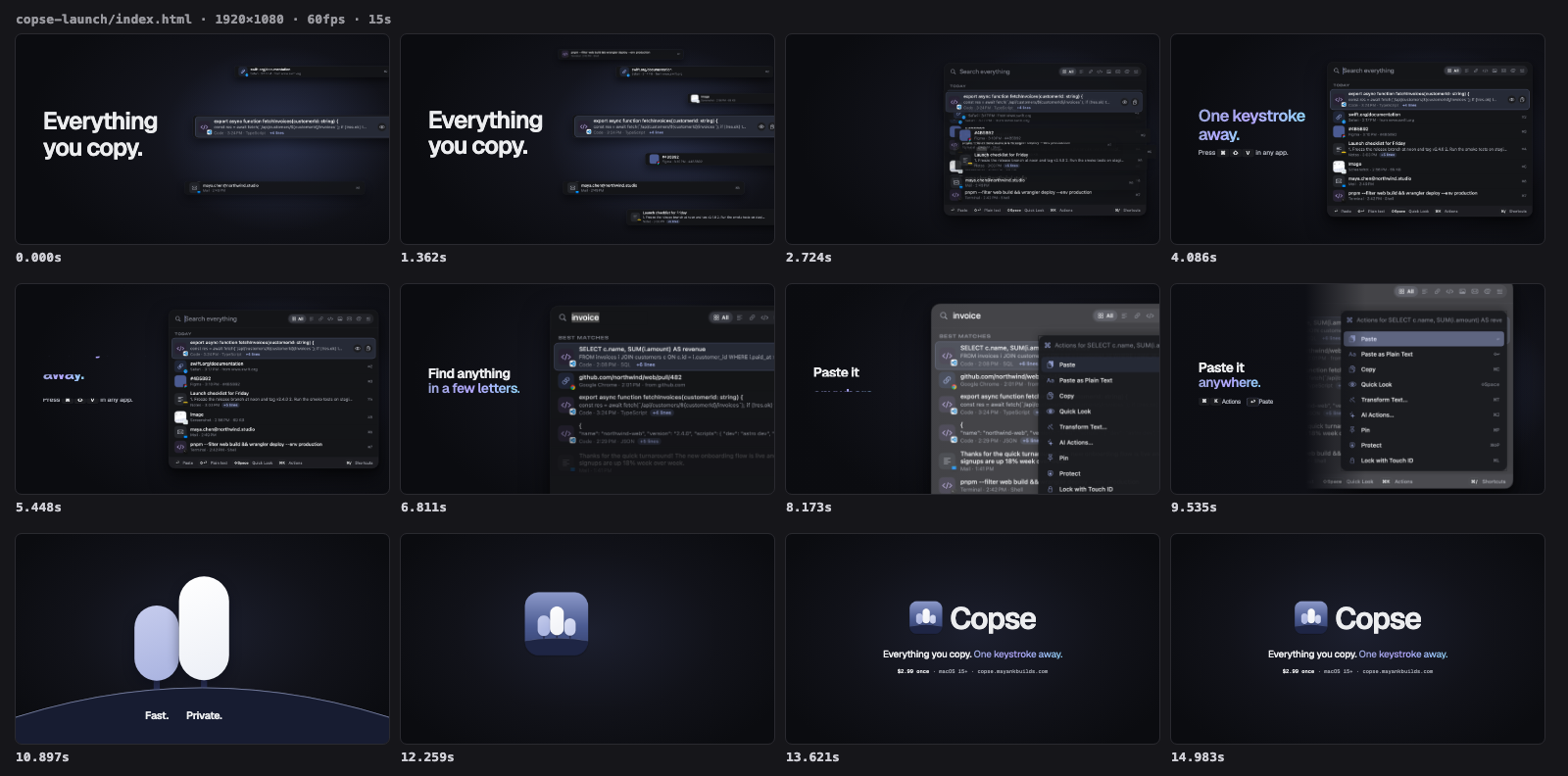
A launch film for a real Mac app, cut on its own keystroke
YouMake a 15-second launch video for Copse, our macOS clipboard manager, for the website and X. Use the real app: real screenshots, icon, name, tagline and brand look. 16:9, with sound.
Brief mode with a real product. The agent read the repo for the tagline, price, brand tokens and fonts, then built the film from the app's own dark-mode panel snapshots. The tagline is split by the keystroke: real clip rows float around "Everything you copy.", ⌘ ⇧ V lands on three beats and the rows snap into the real panel. The camera pushes onto search, the actions menu and paste, and the icon's three trees grow into the Copse icon for the lockup. The score drops on the V press and puts a cue on every key and cut.
◆ Check passed: no layout or timing issues found.
◆ Rendering 900 frames × 4 motion-blur samples (1920×1080 @ 60fps, 6 workers)…
◆ Score synthesized (driving, 120 BPM, 28 cues, -14.0 LUFS)
◆ Encoding MP4 with ffmpeg…
◆ Done in 404.7s (capture 399.0s, 9.0 shots/s) → examples/output/copse-launch/copse-launch.mp4 (3.14 MB, 900 frames, 15s)
Example 3
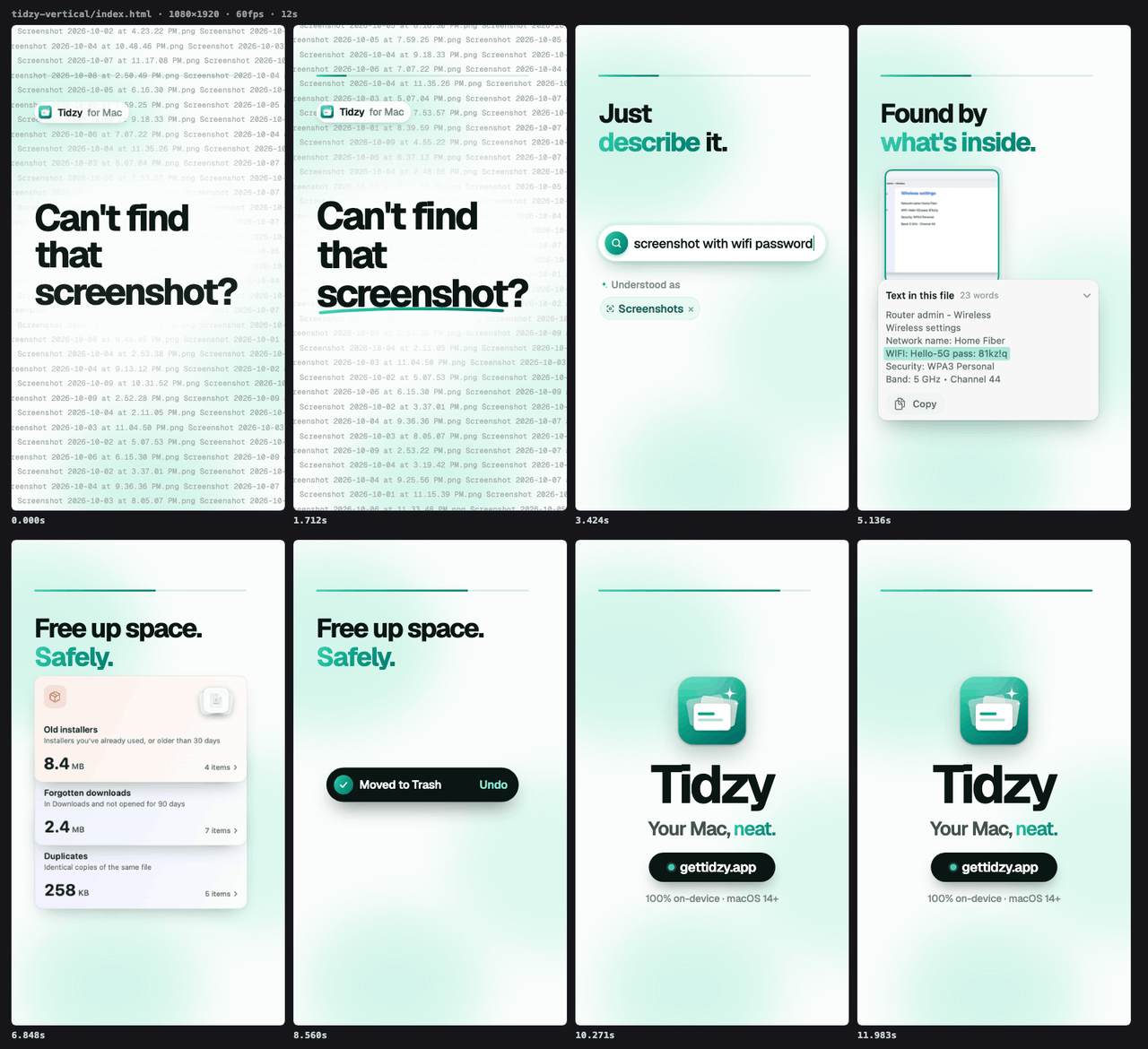
A 12-second vertical ad for a real Mac app
YouMake a 12-second vertical (9:16) ad for Tidzy for Reels/TikTok/Shorts. Hook in the first second, show the real app finding a file instantly and freeing up space, end on the name and site. Use the real screenshots and brand. Add sound.
Brief mode with real brand inputs: the README's copy, the website's colors and Geist type, and crops of the app's own screenshots. The poster frame is already the hook: "Can't find that screenshot?" over a wall of identical filenames. The word flies into Tidzy's search bar in a match cut, and the real result is found by the text inside it. The real Clean Up cards fold into "Moved to Trash · Undo", and the green check floods the frame and shrinks into the app icon. Text stays inside the 9:16 safe zones.
◆ Check passed: no layout or timing issues found.
◆ Rendering 720 frames (1080×1920 @ 60fps, 6 workers)…
◆ Score synthesized (driving, 120 BPM, 36 cues, -14.0 LUFS)
◆ Encoding MP4 with ffmpeg…
◆ Done in 131.0s (capture 126.6s, 5.7 shots/s) → examples/output/tidzy-vertical/tidzy-vertical.mp4 (2.69 MB, 720 frames, 12s)
Example 4
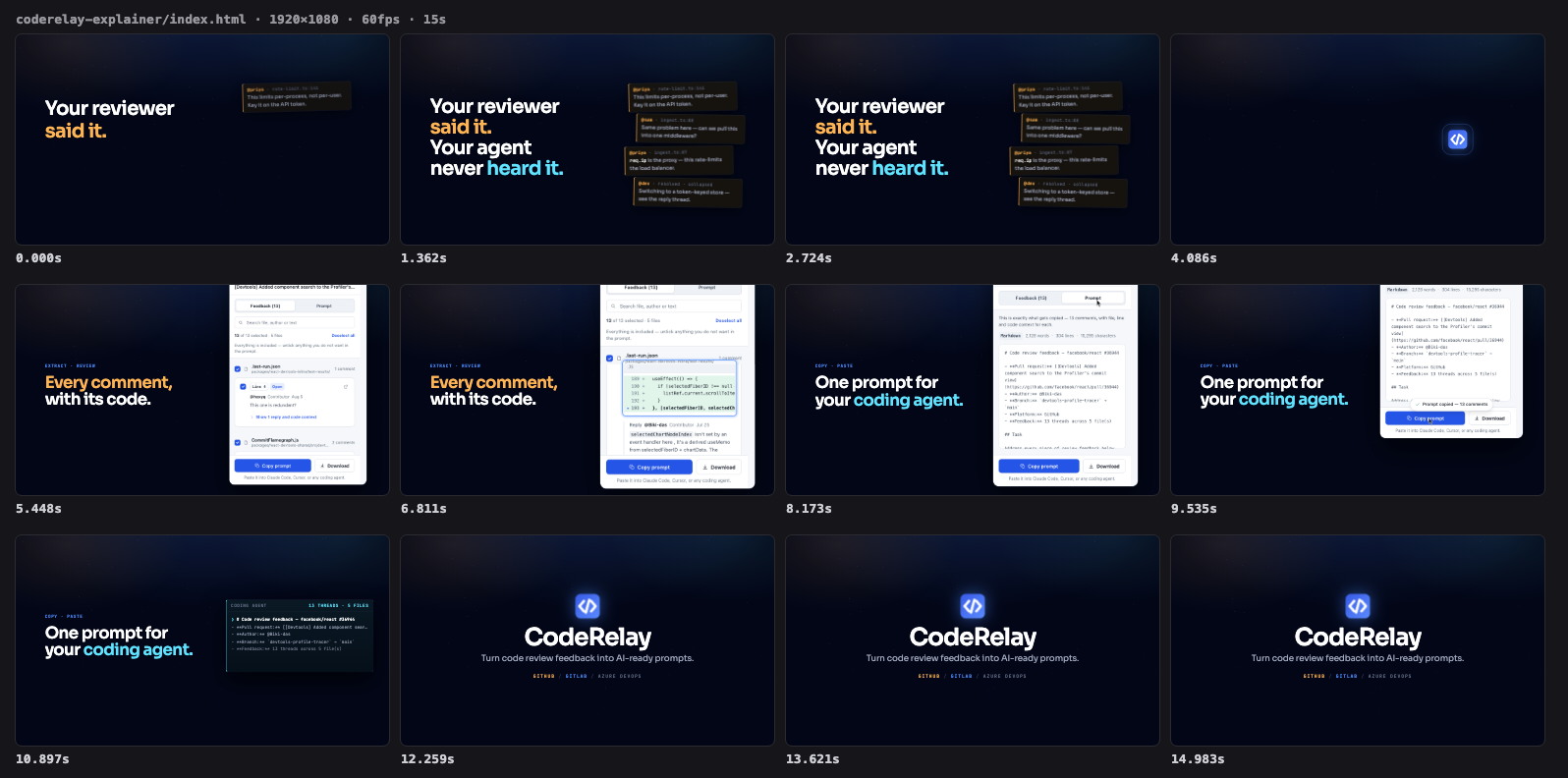
A 15-second explainer for a real Chrome extension
YouMake a 15-second explainer for CodeRelay, our Chrome extension, for the Chrome Web Store listing and X. Show the core idea: open review comments on a pull request turn into one AI-ready prompt you paste into your coding agent. Use the real product: screenshots, icon, name, tagline. 16:9, with sound.
Brief mode, read from the product repo: the site's hero line and its amber/blue/cyan color meanings, the store screenshots, icon, fonts and README tagline. Reviewer comments collapse into the CodeRelay icon, the real side panel opens out of it, and the camera pushes onto a real comment, its diff and the generated Markdown. A click on Copy prompt brings up the app's own toast, and the prompt drops into a coding agent. The score holds the drums back until the panel lands.
◆ Check passed: no layout or timing issues found.
◆ Rendering 900 frames (1920×1080 @ 60fps, 6 workers)…
◆ Score synthesized (driving, 120 BPM, 16 cues, -14.0 LUFS)
◆ Encoding MP4 with ffmpeg…
◆ Done in 83.4s (capture 79.2s, 11.4 shots/s) → examples/output/coderelay-explainer/coderelay-explainer.mp4 (3.23 MB, 900 frames, 15s)
About this skill
Motion Video makes real MP4s, with synced sound, from one line:
- open creative briefs such as the viral "make a dynamic 15-second motion graphics video that shows what an incredible motion designer you are… go all out"
- concrete jobs: launch videos, logo stings, kinetic type, data stories, app showcases and vertical social clips
Each video is plain HTML, CSS and canvas on a tiny deterministic timeline. Playwright captures every frame and ffmpeg encodes them, and a built-in synthesizer scores the picture: music on the beat grid, plus whooshes, hits and risers placed on every cut.
Tested on Claude Opus 5.5. The skill pins model: claude-opus-5-5 with effort: xhigh. Other models are untested, and the instructions are tuned to how Opus 5.5 plans, critiques and iterates.
Two modes
| Mode | Triggered by | Behaviour |
|---|---|---|
| Creative freedom | "go all out", "showreel", "impress me", "show what you can do" | No questions, no approval gate. It picks a concept with a single visual thread, an art direction, a BPM and 5–7 shots that each show a different technique. It builds them with match cuts and floods, scores the result, and reviews it against a reel rubric |
| Brief | A product, feature, logo, stat or message | Asks up to 3 questions, gets your 👍 on a storyboard, then follows your brand |
The creative mode is built to avoid the reel everyone gets from that prompt (dark background, neon accent, "MOTION / PRINCIPLES", particles spelling a name, a grain-and-timecode HUD). See references/showreel.md.
Why it's different
| Aspect | Motion Video | Prompting an agent to "make a video" |
|---|---|---|
| Plans first | A beat-grid shot list with a concept, palette and sound cues | Jumps straight to code |
| Sound | Synthesized score and sound effects synced to every cut, mixed to -14 LUFS | Silent, or a separate tool |
| Sees its output | Reads filmstrips and stills at every cut, then fixes what it finds | Can't watch video, so ships blind |
| Lints itself | --check flags off-frame, overlapping or tiny text, unloaded fonts, cut-off animations and empty poster frames |
Not available |
| Craft built in | Concept seeds, a technique palette with code, editing rules, a reel rubric, timing tables and safe zones | Generic tweens |
| Zero lock-in | One HTML file plus a small MIT runtime: no framework, no license fees | Not applicable |
Example prompts
- "Make a dynamic 15-second motion graphics video that shows what an incredible motion designer you are, like it's your showreel for a résumé. Go all out."
- "Make a 12-second launch video for our v2 release. Use the colors from our Tailwind config."
- "Create a 4-second logo sting from
public/logo.svgat 60fps." - "Turn these three stats into an animated data story for LinkedIn (4:5)."
- "Make a vertical Reel with 3 CSS tips, safe zones respected."
- "Render a transparent lower-third with my name for a YouTube video."
Templates
| Template | Size | Length |
|---|---|---|
showreel |
16:9, 60fps, scored | 15s |
kinetic-type |
16:9 | 10s |
product-launch |
16:9 | 13s |
logo-sting |
16:9, 60fps | 4s |
data-story |
16:9 | 10s |
app-showcase |
16:9, 60fps | 10s |
social-vertical |
9:16 | 12s |
Examples
Four real runs, each with its composition and rendered output in examples/. Three are briefs for shipping products, built from each product's own screenshots, copy and brand:
| Example | Mode | Output |
|---|---|---|
| Showreel, "go all out" | Creative freedom | 15s, 60fps, synthesized 25-cue score |
| Copse launch film | Brief, real Mac app | 15s 16:9, cut on the app's own ⌘⇧V keystroke |
| Tidzy vertical ad | Brief, real Mac app | 12s 9:16 with safe zones and a match-cut hook |
| CodeRelay explainer | Brief, real Chrome extension | 15s 16:9 problem → product → result |
Runtime highlights
- Tweens with grid and center staggers, springs, and named premium easing curves.
Motion.beats({ bpm })for cutting on the beat, andMotion.score()/Motion.cue()for sound.Motion.canvas(),Motion.noise()andMotion.textPoints()for particles and generative art.Motion.morph()between any SVG shapes, plusMotion.draw(),split(),counter()andtype().- Seekable CSS animations and video elements, and a live preview player with a scrubber.
Requirements
- Node 18+
- ffmpeg (
brew install ffmpegon macOS,apt install ffmpegon Ubuntu) - Playwright and Chromium, which
scripts/setup.shinstalls on first use
Use the renderer directly
bash scripts/setup.sh
node scripts/new.mjs showreel my-reel
open my-reel/index.html                                 # live preview with scrubber
node scripts/render.mjs my-reel/index.html --filmstrip 20
node scripts/render.mjs my-reel/index.html --trc srgb   # → my-reel/index.mp4 with the synthesized score
See references/runtime-api.md for the full API.
License
MIT