Examples
Each example is a real run of the skill on a fixture in examples/. Nothing here is mocked up.
Example 1
A marketing page with 19 planted accessibility bugs
YouAudit this landing page for accessibility and fix everything serious.
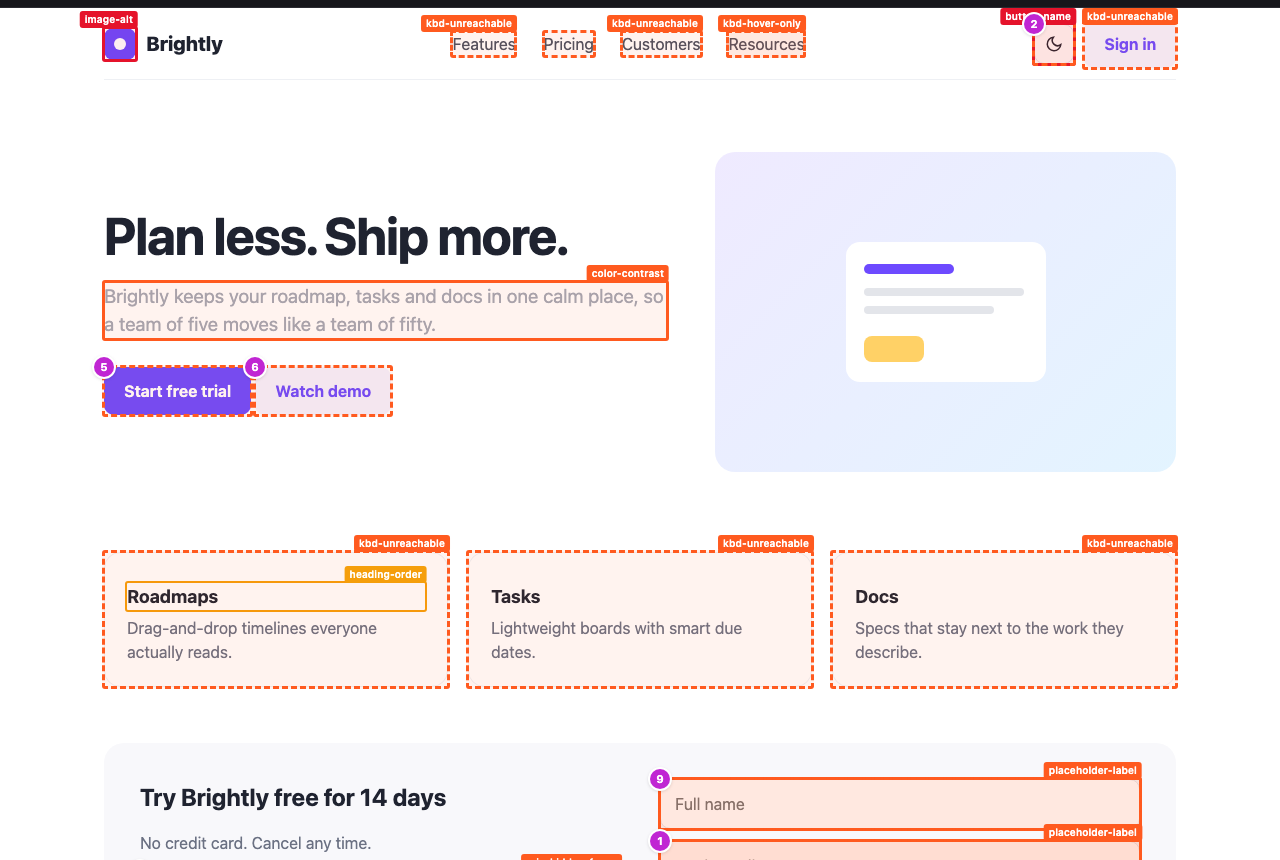
A SaaS landing page built the way generated UIs often are: clickable divs, outline:none, placeholder-only fields, a newsletter form that traps Tab, a hover-only menu, a cookie bar that hides focused controls. axe-core plus the keyboard pass flag 20 rules (4 critical, 12 serious) and rank them in a Fix first list. The fixed twin, with semantic HTML, visible focus and real labels, comes back with 0 issues across 29 focus stops.
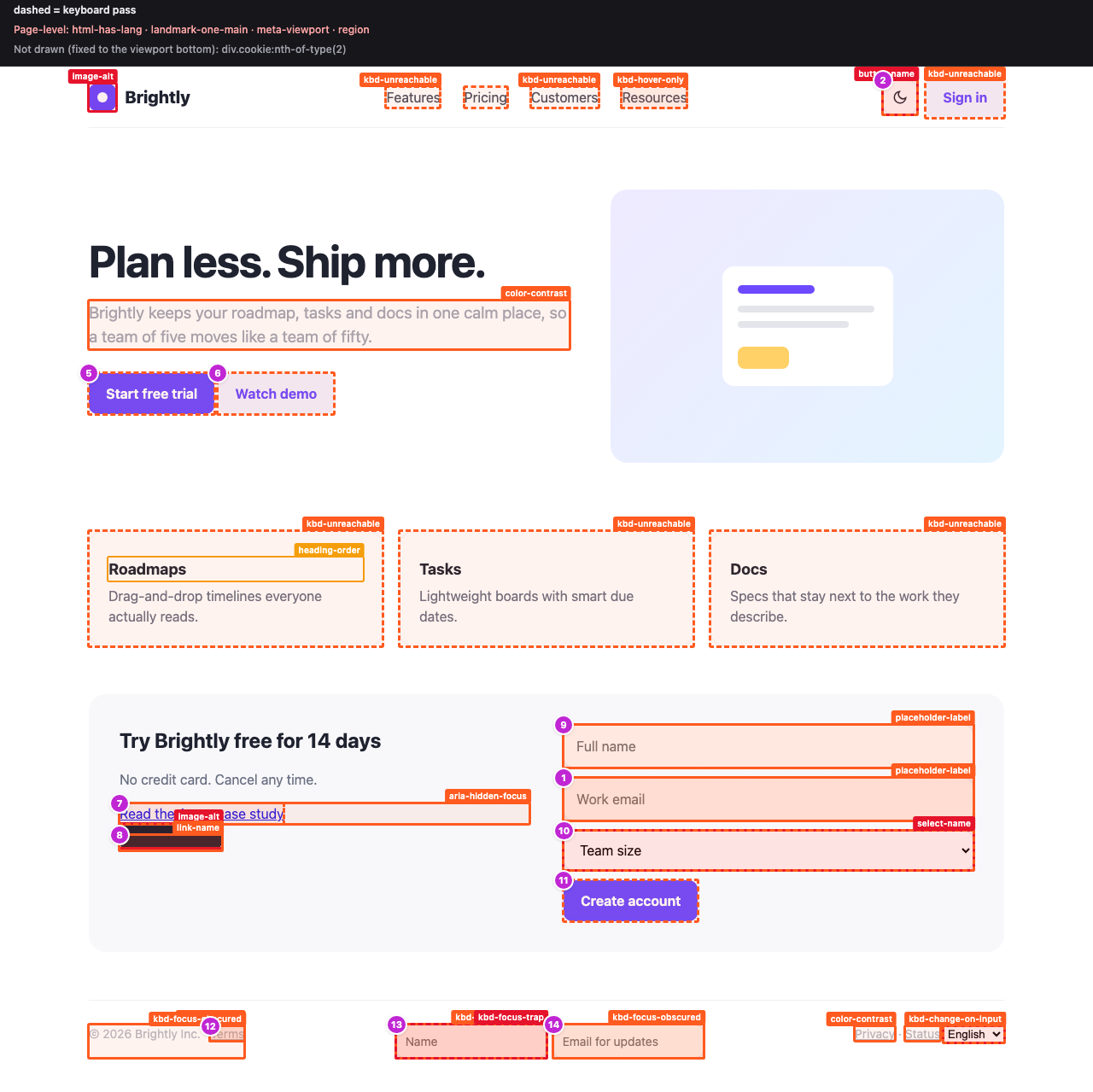
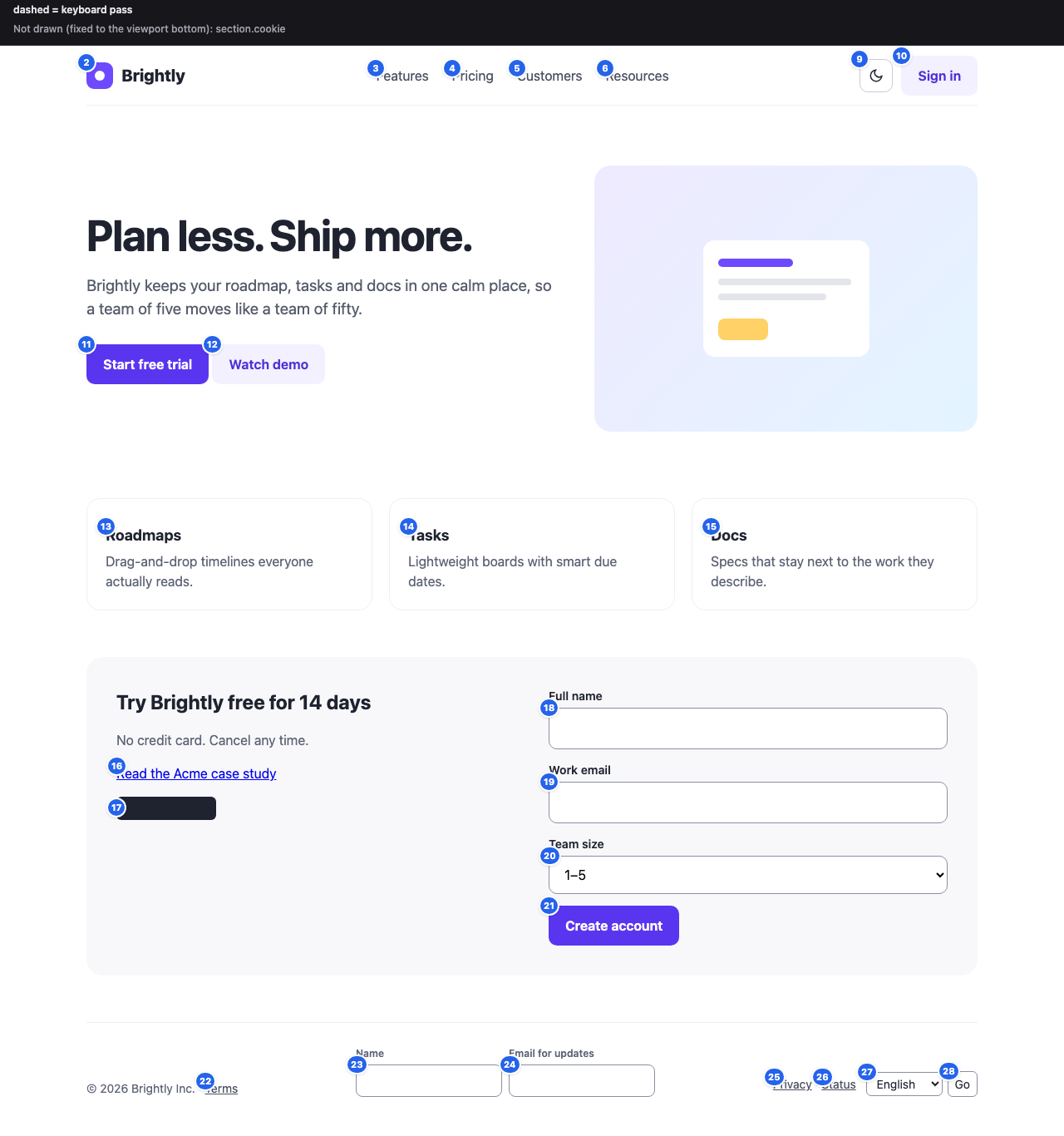
## Fix first

Highest impact first, then by how many elements one fix touches (fix the shared component or token once).

1. `image-alt` (critical, 2 elements): Images must have alternative text
2. `select-name` (critical, 2 elements): Select element must have an accessible name
3. `button-name` (critical, 1 element): Buttons must have discernible text
4. `kbd-focus-trap` (critical, 1 element): Keyboard focus is trapped
5. `kbd-focus-not-visible` (serious, 12 elements): Focused element shows no visible focus indicator
6. `kbd-unreachable` (serious, 8 elements): Clickable element cannot be reached with the keyboard
7. `color-contrast` (serious, 5 elements): Elements must meet minimum color contrast ratio thresholds
8. `placeholder-label` (serious, 4 elements): Form field is labelled only by its placeholder
Example 2
A subscription signup form that only looks finished
YouCheck our checkout signup form for accessibility problems and fix them.
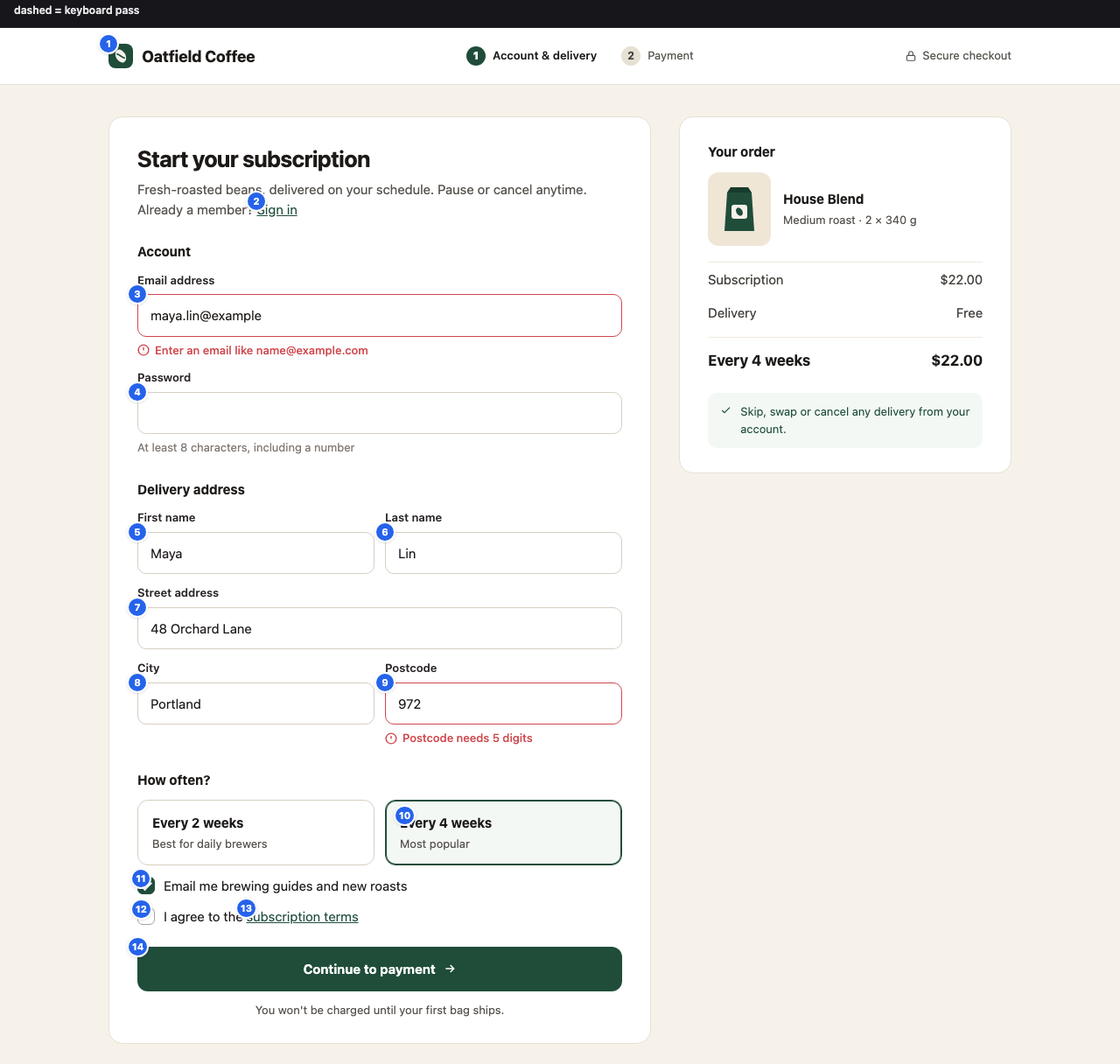
A coffee-subscription signup shown right after a failed submit. The audit flags 7 fields named only by a placeholder, a light-red error message and a grey password hint that fail contrast, two custom checkboxes with no focus ring, and a 'Continue to payment' div that Tab never reaches. contrast.mjs gives the nearest passing shade of each color. Two planted bugs are not machine-checkable: the postcode error shown only as a red border, and errors not linked to their fields with aria-describedby. Those are left for the human review step, and the fixed twin fixes all six and passes clean.
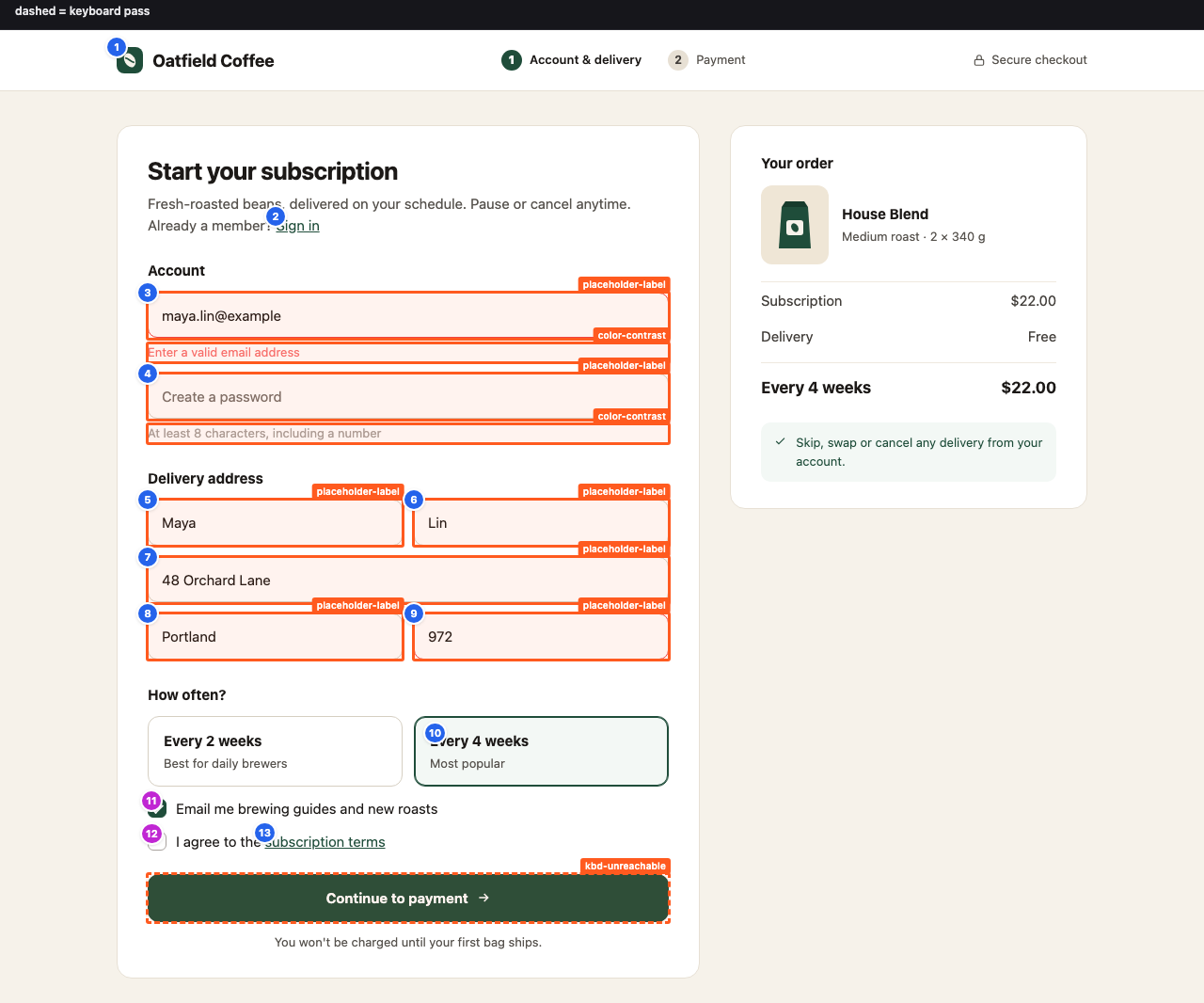
$ node scripts/contrast.mjs "#a8a29e" "#ffffff"
#a8a29e on #ffffff  →  2.52:1
  FAIL  AA                     needs 4.5:1
  FAIL  AAA                    needs 7:1
  FAIL  UI / large-text (3:1)  needs 3:1

  Nearest fg for 4.5:1 (same hue; ΔE = OKLab distance, 0.02 ≈ just noticeable):
    #7e7570  4.50:1  darker  ΔE 0.147  oklch(56.9% 0.014 51.2)
Example 3
An app shell whose modals leak focus and ignore Escape
YouMake the inbox nav and the New ticket modal keyboard accessible.
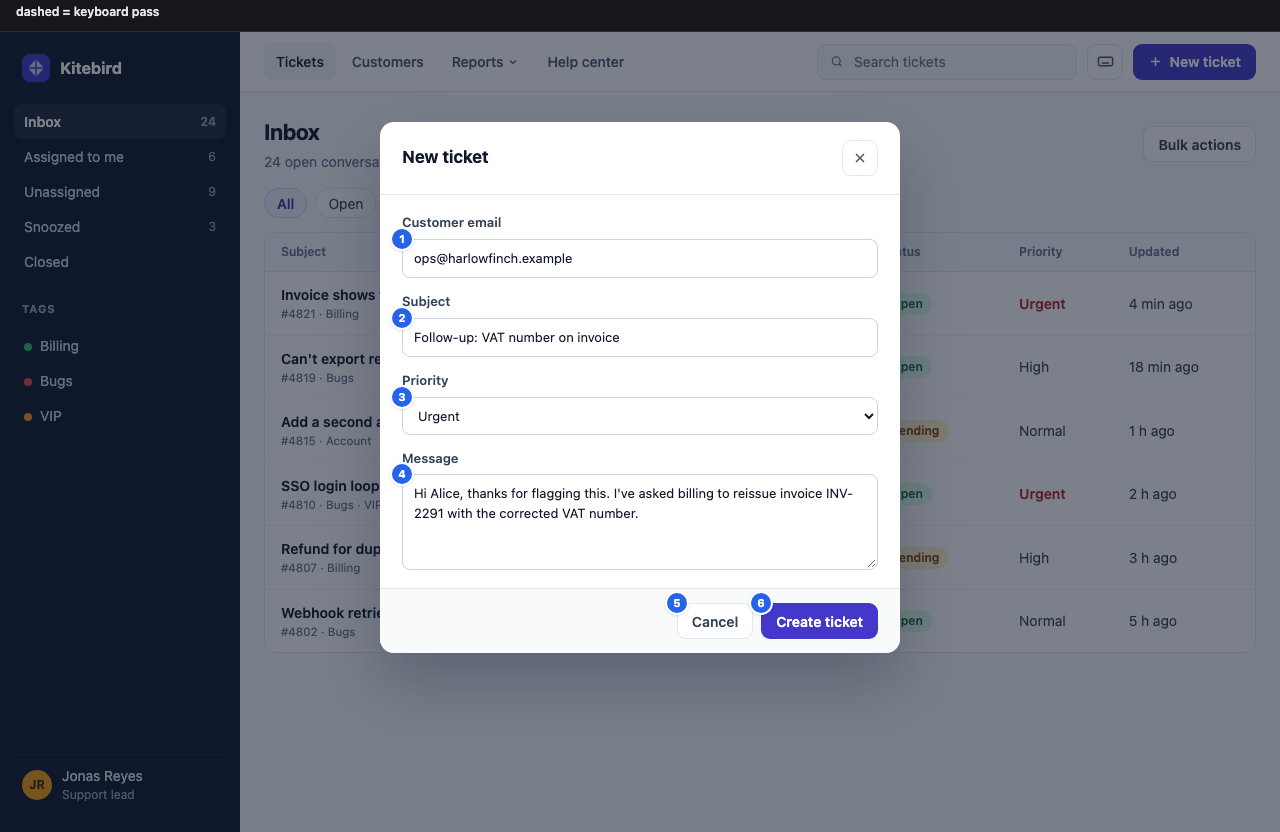
A support-desk inbox with a hover-only Reports menu and two hand-rolled modals, audited with --state to open each one. In the New ticket modal, Tab walks through 12 inbox controls hidden behind the backdrop, reported as focus leaking out of the open modal (kbd-focus-outside-modal), and Escape does nothing. The Keyboard shortcuts modal closes on Escape but drops focus to <body> instead of its button. With a disclosure button for the menu and native <dialog> with showModal() for both modals, all three states pass.
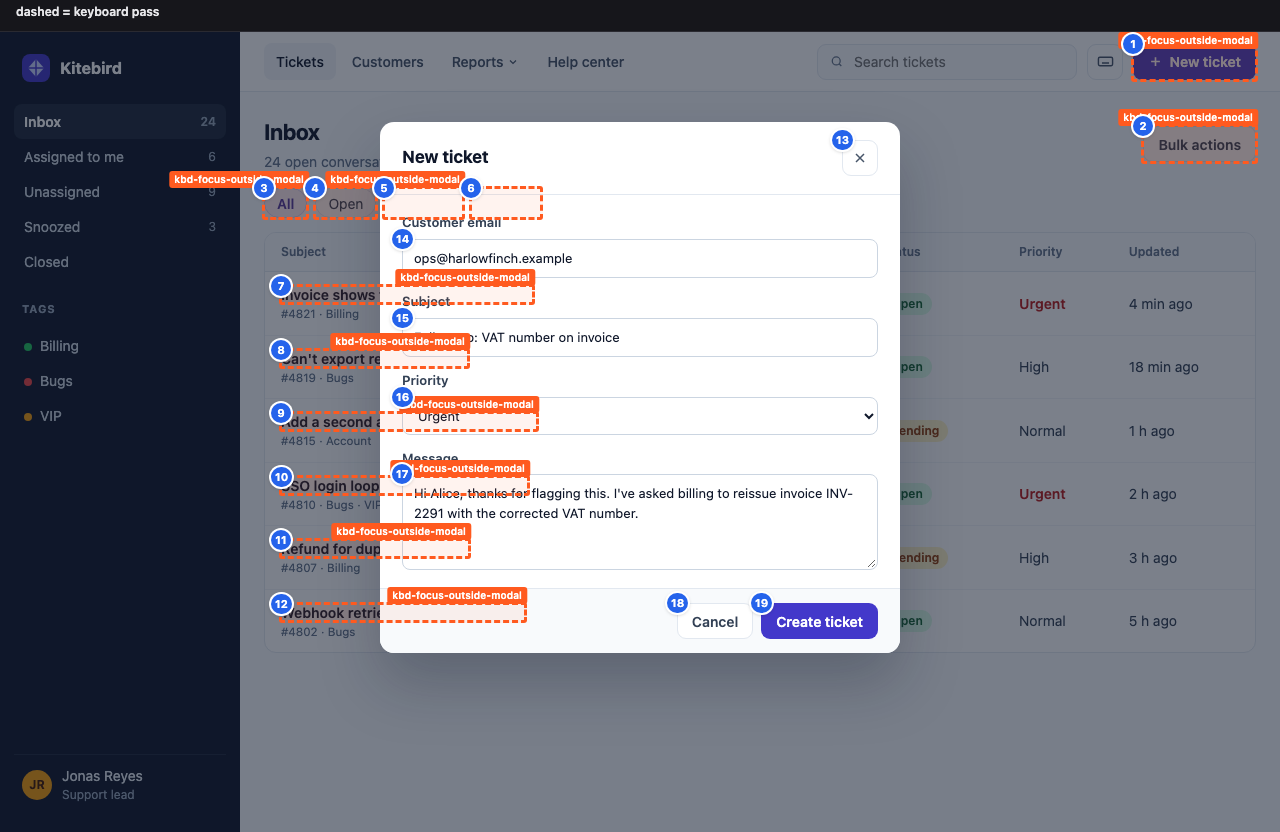

1. `kbd-focus-outside-modal` (serious, 12 elements, 1 page): Focus leaves the open modal for the page hidden behind it
2. `kbd-hover-only` (serious, 1 element, 1 page): Menu opens on mouse hover but not from the keyboard
3. `kbd-dialog-escape` (moderate, 1 element, 1 page): Escape does not close the open modal dialog (ARIA APG dialog pattern)
4. `kbd-dialog-focus-return` (moderate, 1 element, 1 page): Closing the dialog does not return focus to its trigger

## Keyboard: app-shell--state-1 (state: `#new-ticket`)
| 1 | `#new-ticket` | New ticket | yes · **behind open modal `#ticket-backdrop > div.modal`** |
| 2 | `div.head:nth-of-type(1) > button.btn.btn-ghost` | Bulk actions | yes · **behind open modal `#ticket-backdrop > div.modal`** |

  - After Escape closed the dialog, focus went to the page body instead of the trigger `#shortcuts-btn`.
About this skill
Generated UIs look fine and are often unusable with a keyboard or a screen reader: clickable <div>s, outline: none, placeholder-only inputs, grey-on-white text. Most accessibility skills just give the agent a list of guidelines. This one runs real tools, shows the agent what it found, and keeps it fixing source until the page passes.
What it does
- axe-core audit: injects axe-core 4.13 into the page with Playwright (lazy iframes loaded first) and runs the WCAG 2.0/2.1/2.2 A + AA and best-practice rules.
- Keyboard pass (things axe can't check): presses Tab through the page for real and records:
- focus order (numbered on the screenshot), focus traps and which elements they make unreachable
- controls with no visible focus indicator (screenshot before vs. after focus, pixel diff; also finds rings drawn on a card, a label, or a sibling)
- focus removed by a script (
onfocus="blur()"), and focus hidden under a sticky header or cookie bar (WCAG 2.2 SC 2.4.11) - clickable elements keyboard users can't reach (cursor:pointer,
onclick, interactive roles, real click listeners) - menus that open on hover but not from the keyboard
<select>s that navigate as soon as they change (3.2.2; the navigation is blocked, nothing new loads)- with
--stateon a modal: does Escape close it, does focus return to the trigger, and does Tab leak out to the page behind it - focus landing on invisible elements, positive
tabindex, focus jumping backwards on screen
- Report:
report.mdopens with a prioritized "Fix first" list, groups identical markup, gives each rule the WCAG criteria, a fix, a note for your stack when it detects one (Next/React, Vue/Nuxt, Svelte, Angular, Astro, Tailwind, MUI, Radix), and anrgcommand to find the element in source;report.jsonfor tooling; an annotated screenshot per page, sliced into readable parts on long pages. - Fix loop: the agent maps each finding to your components, fixes them semantic HTML first, re-runs until there are zero critical/serious issues, then tells you what still needs a human.
- Contrast helper:
contrast.mjsgives the WCAG ratio (truncated, never rounded up), AA/AAA pass/fail, and the nearest passing color with the same hue.
Example prompts
- "Audit my app for accessibility"
- "Is this page WCAG AA compliant? http://localhost:3000/pricing"
- "Fix the contrast issues on the landing page"
- "Make the nav and modal keyboard accessible"
- "Check the signup form with a screen reader in mind"
- "Run an a11y check on dist/index.html and fail if anything serious is left"
Requirements
- Node.js 18+
- Run
bash scripts/setup.shonce. It installs Playwright 1.63.0, axe-core 4.13.0, and Chromium (~150 MB). If Chromium can't be downloaded, an installed Chrome or Edge is used. - A running dev server or a local
.htmlfile. No network calls except loading the page under test, no telemetry.
Try it
bash scripts/setup.sh
node scripts/audit.mjs examples/inaccessible-page.html     # 19 planted bugs, all found (plain axe finds 10)
node scripts/audit.mjs examples/accessible-page.html       # same page, fixed: 0 issues
node scripts/contrast.mjs "#777" "#fff"
Examples
Three worked examples in examples/, each a real run on a fixture next to its fixed twin (manifest: examples/examples.json, output images in examples/output/):
- Marketing page (
inaccessible-page.html): 19 planted bugs → 4 critical · 12 serious · 4 moderate rules; the fixed twin scores 0. - Signup form (
signup-form.html): placeholder-only fields, low-contrast error and hint text withcontrast.mjssuggestions, custom checkboxes with no focus ring, a<div>submit button. - App shell with modals (
app-shell.html,--statefor each modal): focus escaping behind the backdrop, Escape ignored, focus not returned, a hover-only menu; native<dialog>fixes all three states.
Sample output
◆ Auditing file:///…/examples/inaccessible-page.html (1280×800)
◆   axe-core 4.13.0: 12 rule violation(s), 1 need review
◆   keyboard: 14 focus stops, TRAP at #news-name; 12 without visible focus; 8 clickable-but-unreachable
◆   issues by impact: 4 critical · 12 serious · 4 moderate · 0 minor
◆ Report → .knack/a11y-audit/report.md
◆ JSON   → .knack/a11y-audit/report.json
◆ Image  → .knack/a11y-audit/inaccessible-page.annotated.png
$ node scripts/contrast.mjs "#a3a8b5" "#fff"
#a3a8b5 on #ffffff  →  2.37:1
  FAIL  AA                     needs 4.5:1
  FAIL  AAA                    needs 7:1
  FAIL  UI / large-text (3:1)  needs 3:1

  Nearest fg for 4.5:1 (same hue; ΔE = OKLab distance, 0.02 ≈ just noticeable):
    #727684  4.52:1  darker  ΔE 0.164  oklch(56.7% 0.022 273.0)
report.md excerpt:
### `kbd-focus-obscured`: Focused element is entirely hidden behind a sticky or fixed element
3 element(s) · keyboard pass · WCAG 2.4.11 Focus Not Obscured (Minimum)
**How to fix:** Reserve room for the sticky/fixed layer: html { scroll-padding-top: …; scroll-padding-bottom: … } …
- `#news-name`
  - `<input id="news-name" placeholder="Name">`
  - When focused, this element is entirely covered by the fixed/sticky element `div.cookie:nth-of-type(2)`.
  - find in source: `rg -n -F "news-name"`
How well it works
Measured in October 2026 against public pages (re-run the same commands to reproduce):
- Recall, W3C "Before and After" demo (BAD): on the four inaccessible pages, of the 59 issues W3C documents (page annotations plus the evaluation reports), plain axe-core 4.13 finds 18 and this skill finds 26. The extra 8 are behavior axe does not test: links that throw focus away (F55) and the "quick menu" that navigates on change (3.2.2). Most of what neither finds needs judgment (alt text quality, reading order, fake headings, lists and tables), which is exactly the part left for a human.
- Precision, accessible sites: GOV.UK (3 pages), the GOV.UK Design System (10 pages, including custom checkboxes and radios), and W3C WAI (4 pages incl. an APG modal): no findings from the keyboard pass or placeholder check. Earlier versions raised false alarms here (custom checkboxes reported as invisible, an iframe "without focus", a back-to-top link "jumping"); those are fixed.
- Contrast: ratios match the WebAIM checker on 13 of 13 pairs (to the digits WebAIM shows), alpha compositing matches axe-core, and every suggested color re-checked on WebAIM passes. Against an exhaustive search of all 16.7M sRGB colors, the suggestion is within 5% of the true nearest passing color in OKLab for chromatic colors; for grays it stays neutral (at most 0.002 ΔE further, far below what anyone can see).
Files
| Path | What |
|---|---|
SKILL.md |
The workflow the agent follows |
scripts/audit.mjs |
axe-core + keyboard pass + annotated screenshot + reports |
scripts/contrast.mjs |
Contrast ratio and nearest passing color |
references/fix-recipes.md |
Before/after fixes (HTML, JSX, Tailwind) for ~35 rules, including every keyboard-pass rule |
references/manual-checks.md |
The checks no tool can do: screen reader, zoom/reflow, motion, captions |
examples/ |
Three example pairs, each a fixture with planted issues and its fixed twin (marketing page, signup form, app shell with modals), plus examples.json (prompts, commands, results) and the annotated output images in output/ |
Honest limits
Automated testing finds only part of the barriers: in GDS's test page with 142 known barriers, the best tool found 40% and axe 29% (GDS audit); Deque reports 57% when counting by issue volume (Deque). This skill tests more behavior than axe alone, but it can't judge whether alt text or link text is meaningful, whether reading order makes sense, or whether captions are accurate, and a clean report is not a WCAG conformance claim. It Tabs forwards only (check Shift+Tab under sticky headers yourself), runs Chromium only, and does not measure focus visibility inside iframes. The agent ends every run with a short manual checklist for you, and it will never suggest an overlay widget as a fix.
License
MIT